

Setup your RAISE Certified Node
Table of contents
Requirements
Before starting make sure the machine meets the following requirements:
Registration
In order to download RCN you need an account to RAISE Portal If you have already access, sign in with your username/email and password. If you don’t have an account yet please see User Registration
Node Creation in Portal
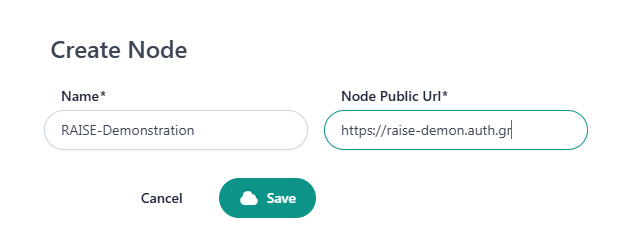
Navigate to Nodes from the left panel and proceed to Create Node

Enter a Name for your RCN.
For the Node Public URL field you can enter the same as for Name, as its not used anymore.
Then click Save
You should see the Registered icon loading.

Click Details, from this window we need the uuid from Node Id for the installation process.

Installation
You need to download the below files in order to install RCN in your machine.
Install RAI Sentinel - Linux
- Download and extract the ZIP
- Run:
sudo chown -R $USER:"$USER" "rai-sentinel" - Make the binaries executable:
sudo chmod +x "rai-sentinel/RaiSentinel.Frontend" "rai-sentinel/RaiSentinel.Service" - Start RAI Sentinel:
sudo "./rai-sentinel/RaiSentinel.Frontend" - Login with your Keycloak Credentials and select your node from the dropdown.
- Start the Node Engine as instructed.
- Start the Deployer if you want the Node Engine to automatically be updated in the background.
Install RAI Sentinel - Windows
- Download and extract the ZIP
- Go inside the ‘current’ folder
- Right-click on
RaiSentinel.Service.exe - Select ‘Properties’
- Check the ‘Unblock’ checkbox
- Press ‘Apply’, then ‘Ok’
- Run
RAI Sentinelas Administrator. - Login with your Keycloak Credentials and select your Node from the dropdown.
- Start the
Node Engineas instructed. - Click on
Start Deployerif you want the Node Engine to automatically be updated in the background.
We’d love your feedback!
After deploying this service, please take a moment to answer a few quick questions and rate your overall installation experience.
Your input will help us improve the process for everyone.
👉 Take the Survey Here